Robot Dogs and Humanoid Robots · Tiered by Grade
Unitree Robotics Courses
Vinci AI is the Official Education and Training Partner of Unitree Robotics, running on-site courses for Hong Kong primary and secondary schools with Unitree robot dogs (Go2 Pro) and humanoid robots (R1). Courses are organized into three levels by grade and coding background, with instructors guiding students as they operate real robots and complete missions.
Primary students get to know humanoid robots through remote control, first-person video and group missions. Junior secondary students use block-based visual programming to design movements and obstacle-avoidance routines for the robot dog. Senior secondary students with a Python or C++ foundation first learn ROS2 and SDK control in simulation, then validate on real robots following safety procedures.
Course topics include:
- Safe Operation and Remote Control: Emergency Stop, Gait and Center of Gravity (Primary, R1)
- Vision and Multimodal AI: First-Person Video, Sound Source Localization and Voice Q&A (Primary, R1)
- Visual Programming: Motion Sequencing, Event Triggers and Obstacle-Avoidance Logic (Junior Secondary, Go2 Pro)
- Sensor Applications: LiDAR Distance Data and Smart Following (Junior Secondary, Go2 Pro)
- Python SDK and ROS2: Joint Control, Kinematics and Gait Parameters (Senior Secondary, R1 EDU)
- Visual Navigation: Depth Imaging, Object Recognition and Visual SLAM (Senior Secondary, R1 EDU, in simulation)
Why Choose Our Unitree Courses?
Three Levels by Grade
Primary, junior secondary and senior secondary each have their own entry point, with different audiences, prerequisites and hours. Schools choose by student level, so not every student has to start from the same place.
Simulation First, Then Real Robots
Senior secondary students first write and test programs in the official Unitree simulator; only after validation does the instructor run them on a real robot. The whole class can practice at once, with no waiting for a single robot.
Built Around Real-Robot Missions
Primary students work in groups to complete navigation challenges by remote control and first-person video; junior secondary students write obstacle-avoidance programs for Go2 Pro; senior secondary students deploy motion and visual-tracking programs written in simulation to R1 EDU.
Official Education and Training Partner
Vinci AI is the Official Education and Training Partner of Unitree Robotics and has delivered Unitree training in Hong Kong, Malaysia, Vietnam, the United States, Australia and Central Asia.
About the Robots
Courses use the Unitree Go2 Pro robot dog and the Unitree R1 humanoid robot, with a separate curriculum for each.
Unitree Go2 Pro is a quadruped robot dog with LiDAR and a front wide-angle camera. It can be controlled with the official app and programmed with block-based visual coding, making it a good entry point for junior secondary students.
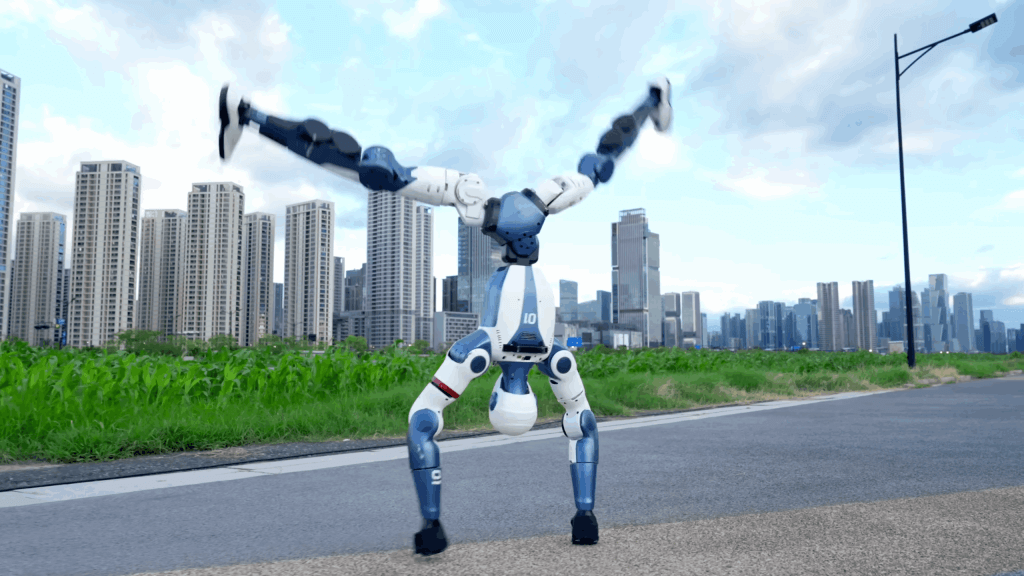
Unitree R1 is a humanoid robot with 26 degrees of freedom, a stereo depth camera and a four-microphone array. Primary courses use R1's remote control, in-app video and built-in voice features; senior secondary courses use R1 EDU, programmed with the Python SDK and ROS2, with a fall-protection stand during real-robot sessions.
Schools choose by grade level; students do not need to finish the robot dog course before moving on to the humanoid robot.
Course Design and Core Content
Courses come in three levels, plus training for universities, research and professional teams.
Primary | R1 Exploration:15 hours, no coding background required, instructor-led.
Junior Secondary | Go2 Pro Visual Programming:Recommended 10 hours, ages 12 to 16, no coding experience required.
Senior Secondary | R1 EDU Advanced Development:Recommended 16 to 20 hours, ages 15 to 18, Python or C++ foundation required.
Hours are recommended teaching hours; actual lessons are scheduled around the school timetable.
Primary | R1 Exploration (15 hours)
Hardware and Safety (3 hours):Learn R1's joints and structure, practice one-button stand-up, lie-down and emergency stop, and measure safe distances on site.
Remote Control and Gait (3 hours):Learn to move, turn and switch modes with the remote, then complete an S-shaped cone course in the classroom.
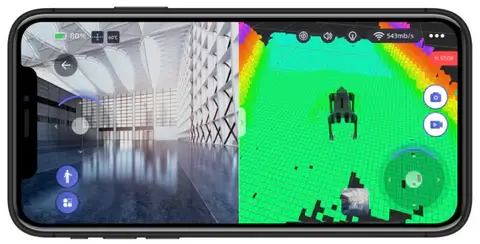
App and First-Person Video (3 hours):Read data such as battery level and joint temperature; one student watches the app video while another drives, guiding R1 along a set route together.
Multimodal AI (3 hours):Test object recognition, color tracking and sound source localization, and hold Q&A using the built-in voice features.
Campus Mini-Project (3 hours):Groups design a campus mission, such as a “Campus AI Guide”, and demo it live to the class.
Junior Secondary | Go2 Pro Visual Programming (Recommended 10 hours)
Structure and Safety:Joints and gait, LiDAR and camera placement, plus fall protection, emergency stop and battery care.
App Motion Sequencing and Smart Following:Use the official app to choreograph motion sequences and set the follow distance and angle.
Visual Programming:Use events, loops and variables to guide Go2 Pro along a set route; read LiDAR distance data and write an obstacle-avoidance program that “turns and gives an alert when an obstacle is 0.5 m ahead”.
Voice and Video:Try the built-in voice assistant and view the camera feed in the app to simulate campus patrols and filming.
Class Size and Space:We recommend 3 to 4 students per robot, in an open indoor space with a non-slip floor.
Senior Secondary | R1 EDU Advanced Development (Recommended 16 to 20 hours)
Getting to Know the Robot and Safety:The layout of its 26 degrees of freedom, setting up the fall-protection stand, emergency stop, and the built-in sound source localization and visual following features.
Development Environment and Simulation:Set up a Linux and ROS2 development environment, install the official Unitree simulator and load the R1 model.
Kinematics and Gait:Use the Python SDK to control single and multiple joints, understand center of gravity and balance, adjust walking parameters, and design custom movements.
Visual Perception and Navigation:Read depth images, identify objects using OpenCV and YOLO, and make the R1 head follow the target; use visual SLAM to build a map and plan obstacle avoidance paths.
Equipment and Class Size:Each student needs a computer that can run Ubuntu; for real-robot deployment we recommend 4 to 5 students per robot.
Universities, Research and Professional Teams
1 day:Technical assessment and equipment demonstration (7 to 8 hours) for lab decision-makers, researchers and engineers, mainly through demos and discussion.
3 days:Hands-on work with one chosen platform (21 to 24 hours); requires a foundation in Python, C++, Linux and ROS2.
7 days:Advanced R&D training covering simulation, perception and navigation, control and an integrated project, arranged around your platform and equipment.
Request the full course syllabus
Tell us on WhatsApp which courses your school is interested in, and our consultant will send you the documents you need for curriculum planning and grant applications:
-
📘 Course Unit Structure: Syllabi covering Python, generative AI art, Unitree robotics courses and more.
-
🤖 Hardware specifications: Unitree Robots (Go2, R1) and UGOT robot hardware details
-
🏆 Activity plans: STEM Day schedules and inter-school competition details
Which funding can pay for Unitree courses?
On-site Unitree Robotics Courses, STEM Day and competition training count as student AI and STEAM activities, which schools can generally plan with the two existing funding sources below. Use of funds is subject to EDB circulars; Vinci AI helps schools prepare course content, quotations and activity records, but cannot guarantee approval on a school's behalf.
Life-wide Learning and Sister School Grant (disbursed annually)
EDB Circular No. 9/2025 explicitly covers promoting digital education, AI and STEAM education, and allows schools to procure services from external organizations.
Applies to:Unitree on-site workshops, STEM Day, competition training.
Note:Equipment spending must not exceed 15% of the total grant each year; this grant cannot fund teacher training.
AI for Empowering Learning and Teaching Funding Programme (HK$500,000 per school, usable until 31 August 2028)
EDB Circular Memorandum No. 221/2025 states the grant can fund student participation in AI activities and the purchase of AI robotics kits.
Applies to:Unitree courses, robotics kits.
Note:Cannot be used for renovation works or teacher courses. SeeWhat the AI Funding Programme Can Fund.
Planning a permanent AI and embodied intelligence lab?
The 17th and 18th calls for applications of the Quality Education Fund (QEF) can fund works, equipment, curriculum and teacher training, making it suitable for building a permanent lab through a school-based curriculum project. See QEF funding limits and timeline and AI & Embodied Intelligence Lab.
AI competition tips
FAQ
Which grade levels is this course for? Do students need coding experience?
Courses come in three levels: Primary R1 Exploration and Junior Secondary Go2 Pro Visual Programming require no coding experience; Senior Secondary R1 EDU requires a Python or C++ foundation, and familiarity with Linux commands is recommended.
What are the main differences between Go2 and R1 courses?
Go2 Pro is a quadruped robot dog; the junior secondary course uses block-based coding to design movements and obstacle avoidance. R1 is a humanoid robot: the primary course explores its remote control, video and voice features; the senior secondary course uses R1 EDU to learn kinematics and visual navigation with the Python SDK and ROS2.
Does the school need to buy its own robots?
For on-site courses, Vinci AI provides the robots and instructors. Schools that want robots on campus long-term can also purchase them through us. The Senior Secondary R1 EDU course also requires one computer per student that can run Ubuntu; details are confirmed at the quotation stage.
What if a robot breaks down?
In class, instructors run the robots following safety procedures. If equipment the school has purchased needs maintenance or repair, our technical team, including mechanical engineers, will help.
What class size and space are required?
For Junior Secondary Go2 Pro, we recommend 3 to 4 students per robot in an open indoor space with a non-slip floor; for Senior Secondary R1 EDU real-robot sessions, 4 to 5 students per robot with a fall-protection stand. Primary R1 Exploration groups are arranged by class size and space; details are confirmed when you inquire.

AI courses for primary and secondary schools
School Case Studies
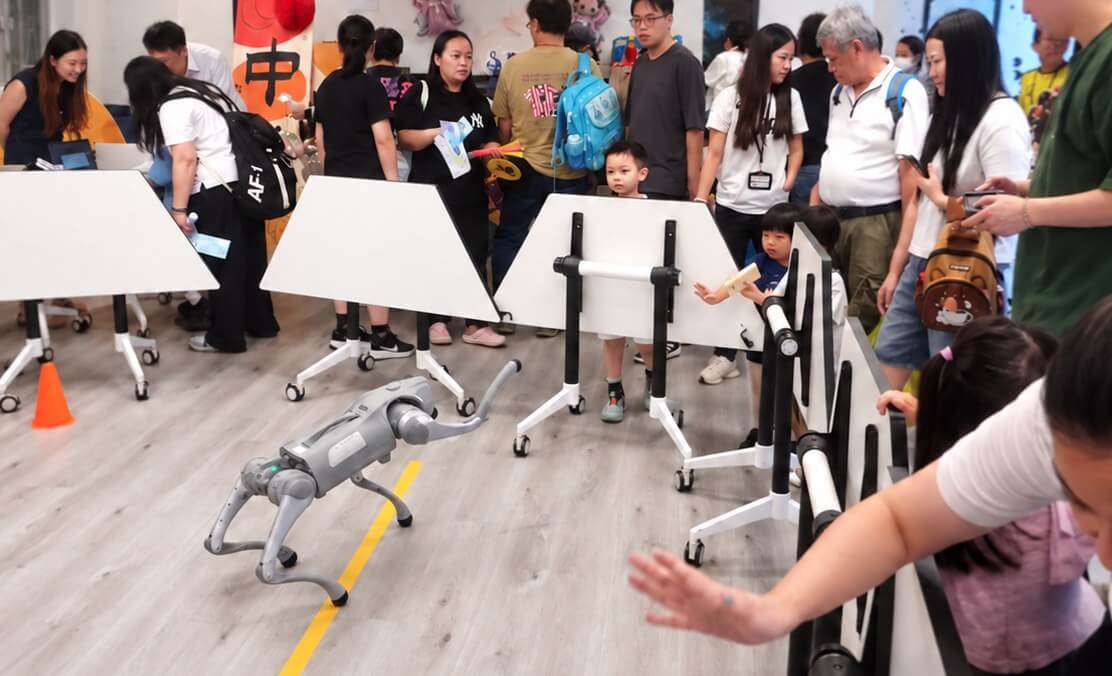
AI for All Robotics Workshop at Aplichau Kaifong Primary School: Unitree Go2 Robot Dog Comes to Primary School
As a service provider for Cyberport's “AI for All” program, Vinci AI held a robotics workshop at Aplichau Kaifong Primary School, letting students, parents and community partners operate and observe Unitree robots up close.
Why Vinci AI?
Vinci AI is the Official Education and Training Partner of Unitree Robotics. Courses are designed and taught by instructors with university teaching experience, with mechanical engineers supporting equipment maintenance.
Taught by University Lecturers
Our team includes lecturers who teach at universities.
Designed with AI Experts
The course design team includes doctorate-holding AI and data analytics experts.
Official Education and Training Partner
Courses are built on official Unitree hardware and software and delivered by Unitree's Official Education and Training Partner.
Planning an on-site course for your school?
Contact our consultants
Vinci AI runs on-site courses, including STEM Days, competition training and after-school programs. Contact our consultants and we'll help you choose suitable topics and formats.